Open Source · BPMN 2.0 · Node.js

Workflow automation that
runs inside your app

bpmn-server is a lightweight, embeddable BPMN 2.0 engine for Node.js — with built-in persistence, a visual modeler, and a ready-to-deploy web app.

Get started on GitHub Try live demo →
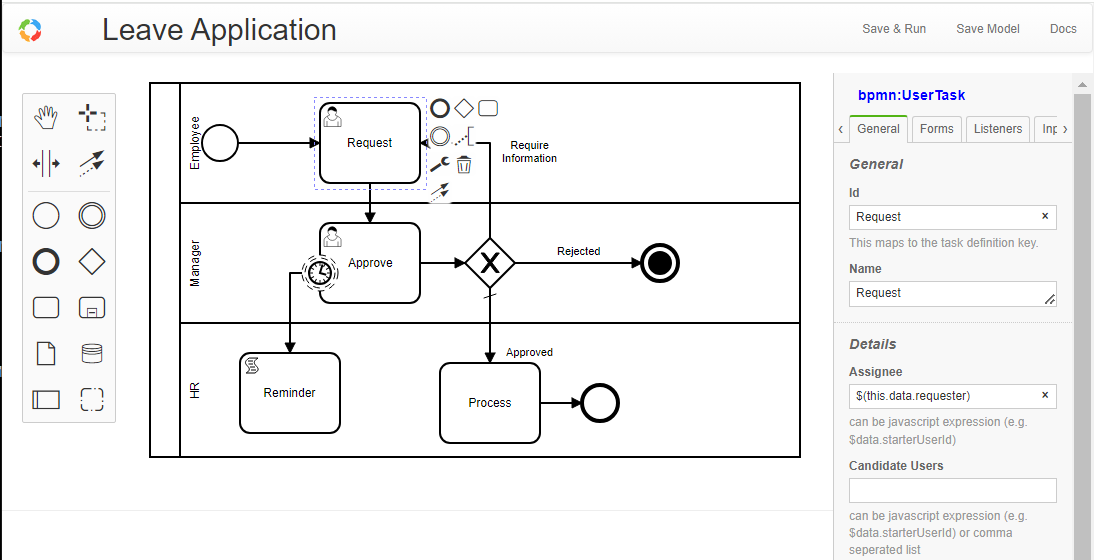
bpmn-server modeler screenshot
Works with 🟢 Node.js 🍃 MongoDB 📐 BPMN 2.0 🎨 bpmn.io 🔷 TypeScript 🔑 Passport.js

Everything you need to automate workflows

From simple approvals to complex long-running processes — bpmn-server handles the hard parts.

🗺️

Visual Modeler

Design workflows in a browser-based BPMN 2.0 modeler powered by bpmn.io — no XML editing required.

Full BPMN 2.0 Execution

Tasks, gateways, events, sub-processes, timers, messages, signals — the complete BPMN 2.0 element set.

💾

Built-in Persistence

Instances, items, and variables are automatically persisted to MongoDB. Resume exactly where you left off.

🔐

User Tasks & Security

Assign tasks to users or groups, enforce candidate rules, and integrate with your existing auth via Passport.js.

🔁

Long-running Processes

Processes survive server restarts, handle wait states, and resume across distributed clusters.

🌐

REST API & Web App

Production-ready Express web app with full REST API, modeler UI, task lists, and instance detail views.

📡

Messages & Signals

Coordinate across process instances with BPMN message flows, signal broadcasts, and event correlation.

🧩

Embeddable & Extensible

Drop into any Node.js app with a few lines of code. Extend with custom delegates and application listeners.

☁️

Google OAuth Ready

Built-in Google OAuth support — users sign in with their Google account, no password management needed.
From model to running process in minutes

bpmn-server bridges the gap between BPMN diagrams and production workflow execution.

1

Design your process

Open the built-in modeler, drag and drop BPMN elements, and define data fields, assignments, and scripts in the property panel.

2

Save & publish

Save your model to the server. bpmn-server stores the BPMN XML and makes it instantly available for execution.

3

Start instances

Call engine.start('myProcess', data) or hit the REST API. A new instance is created and persisted automatically.

4

Users act on tasks

User tasks appear in task lists. Users fill in forms, assign work, and invoke tasks — all tracked in the datastore.

5

Query & monitor

Use the Data API to query instance state, view history, replay from save points, and track process metrics.

Up and running in under 5 minutes

Clone the demo app, configure MongoDB, and start automating.

1 — Clone & install

# Clone the demo web app
git clone https://github.com/
  bpmnServer/bpmn-web.git
cd bpmn-web
npm install

# Run interactive setup
npm run setup

# Edit .env — set your MongoDB URL
npm run setup   # creates DB objects
npm run start

2 — Or embed directly in your app

const { BPMNServer, DefaultAppDelegate }
  = require('bpmn-server');
const { configuration }
  = require('./configuration');

const server = new BPMNServer(
  configuration,
  new DefaultAppDelegate()
);

// Start a process instance
const result = await
  server.engine.start(
    'invoice',
    { amount: 1200 }
  );

console.log(result.instance.id);

Ready to automate your workflows?

Open source, MIT licensed, runs on your own infrastructure. No vendor lock-in.